MailMatter ships a Model Context Protocol server at
https://mailmatter.dev/mcp (Streamable HTTP, stateless). An agent connected
to it can derive addresses, wait for mail, read bodies and links, and clean
up — the whole test loop with no HTTP glue in your prompts. It’s equally the
way to give an agent an email address of its own: somewhere to receive the
signup confirmations and one-time codes it runs into while working.
Auth is an org API key sent as a Bearer header on every request. There is no
anonymous MCP and no OAuth flow: clients that require OAuth (claude.ai web,
ChatGPT web connectors) can’t connect directly — use the REST API there, or
bridge locally with mcp-remote.
1. Mint an API key
Sign in at mailmatter.dev/app (a free account
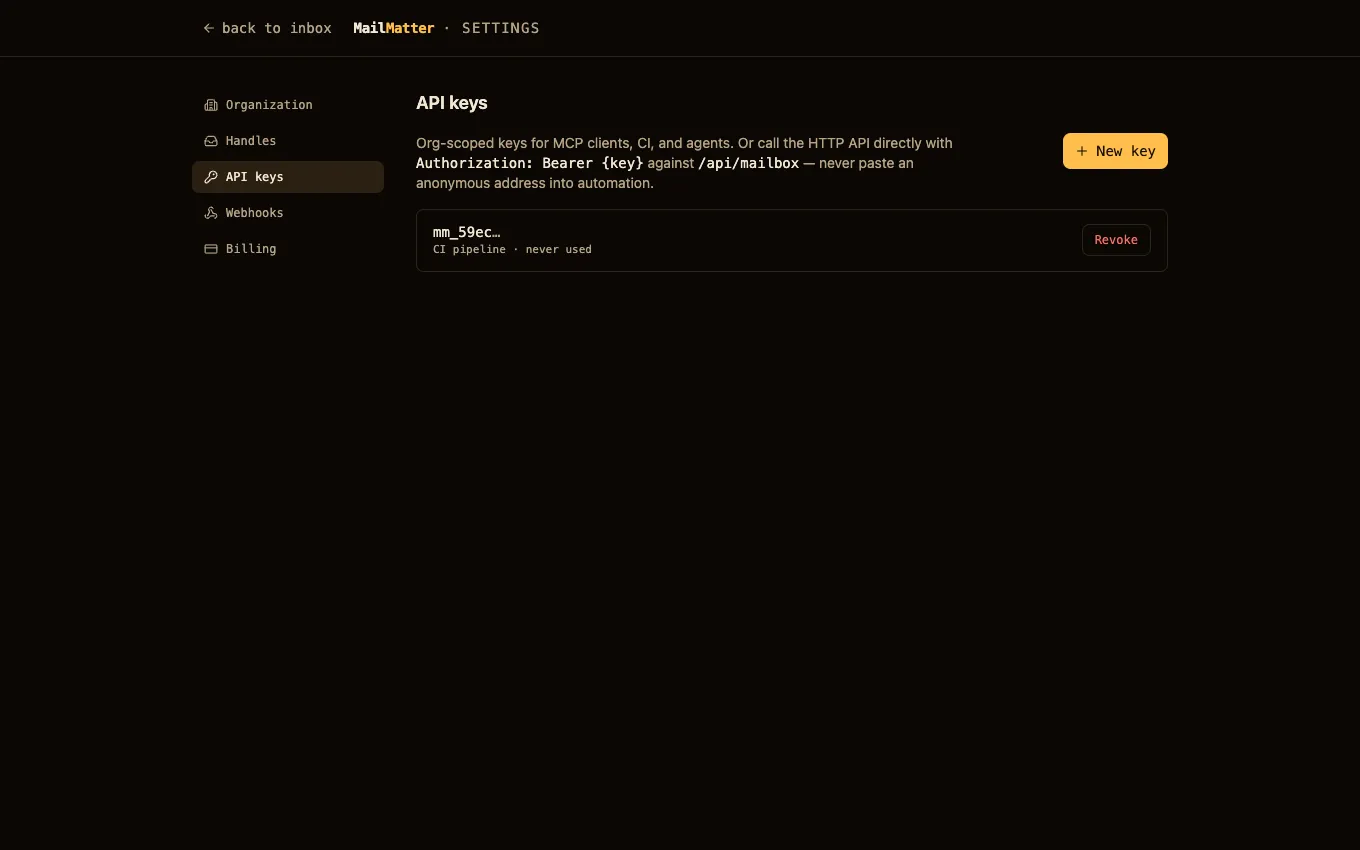
is enough), open Settings → API keys, and press New key. It’s shown
once and looks like mm_….
While you’re there, make sure the org owns at least one handle (Settings → Handles) — the tools read handles but can’t create them.
2. Add the server to your client
Claude Code:
claude mcp add --transport http mailmatter https://mailmatter.dev/mcp \
  --header "Authorization: Bearer mm_<your-key>"
Cursor / VS Code (mcp.json):
{
  "mcpServers": {
    "mailmatter": {
      "type": "http",
      "url": "https://mailmatter.dev/mcp",
      "headers": { "Authorization": "Bearer mm_<your-key>" }
    }
  }
}
3. Let the agent work
The server teaches itself: connecting clients receive MCP instructions
before the first tool call, covering three entry paths — take an address and
hand it out, trigger an email and wait for it, or read mail that already
arrived — plus the two limits worth knowing up front (MailMatter receives
mail; it never sends, and messages expire rather than archive).
A typical agentic test needs no further instruction than “verify the signup email arrives”:
get_addresswith scenariosignup→ an address to register with, plus aserver_time_mswatermark.- Trigger the send.
wait_for_emailwith that scenario andsince= the watermark → the parsed message.- Assert on
text/links, thendelete_mailboxto clean up.
Step 1 handing back the watermark is what makes step 3 reliable: the agent never needs a clock of its own, and taking the timestamp before the send is what stops a leftover message from an earlier run satisfying the wait.
Verify
Ask your agent to call get_address with scenario smoke. You should get
back {handle}.smoke@mailmatter.dev using a handle your org owns. A 401
means the Bearer header isn’t reaching the server or the key was revoked.
Tool reference
| Tool | What it does |
|---|---|
get_address |
Derive {handle}.{scenario}@mailmatter.dev for a test case — no setup; also returns the server_time_ms watermark |
list_inboxes |
Scenarios that have received mail, with counts, newest first |
list_messages |
Summaries in one scenario; optional header filter (X-Test-Run: 42) |
get_message |
Text body, verbatim links, useful headers, attachment metadata (include_html and include_headers opt-in) |
wait_for_email |
Long-poll for the next message after a since watermark (max 55 s) |
delete_mailbox |
Clear one scenario after the run; the handle survives |
The tools read your handles; they never create or release one. That’s a deliberate symmetry with the REST API — an API key opens the same surface in both places, and handle management stays in the dashboard. An org with no handles yet gets an error telling the agent to send you to Settings → Handles first. Scenarios still need no setup, so this is a one-time step.
Notes that keep agents honest:
wait_for_emailreturns{ "message": null }on timeout — a normal outcome, distinct from any error. The result also carries anotesaying which kind of nothing it is: an empty scenario, or mail that arrived before the watermark and is waiting inlist_messages. Those need opposite next moves, and an agent that can’t tell them apart reports “the email never arrived” while the mail sits there.- Quota-withheld messages are never hidden. Over your plan’s volume cap
a message comes back as its envelope stub with
over_quota: trueand a plain-languagehint, so the agent learns “arrived, content gated” — never the false “the email never came”. textis always the readable body. For an HTML-only email — most real mail — it’s derived from the HTML, andtext_sourcesays so. Raw markup stays behindinclude_html: true, because it’s large andtextpluslinksanswer most assertions.- Empty results explain themselves. A scenario with no mail comes back
with a
notenaming the address to send to, rather than a bare empty list that reads like a failure. - Big messages degrade instead of failing. A very large body is truncated
with a
text_truncatedmarker rather than blowing past the client’s token limit and returning nothing — andlinksis always complete, because it’s extracted before the cap. Headers likewise default to the useful set (addressing, threading,x-*); the transport/auth stack (Received, ARC, DKIM) is behindinclude_headers: true, and the omission is announced, never silent. - If your org owns several handles, tools that take an optional
handlewill ask you to pass it explicitly — and the error lists the handles your key can use, so the retry is obvious. - Every tool is annotated (
readOnlyHint,destructiveHint), so clients can auto-approve reads and prompt ondelete_mailbox, the only tool that removes anything.
Next steps
- Testing with MailMatter — the same idioms over REST, with parallel-run isolation patterns.
- Give your AI agent an email address — the longer-form walkthrough on the blog.